<?xml version="1.0" encoding="utf-8"?><feed xmlns="http://www.w3.org/2005/Atom" ><generator uri="https://jekyllrb.com/" version="3.10.0">Jekyll</generator><link href="/hfoss2026-blogs/feed.xml" rel="self" type="application/atom+xml" /><link href="/hfoss2026-blogs/" rel="alternate" type="text/html" /><updated>2026-05-05T02:03:44+00:00</updated><id>/hfoss2026-blogs/feed.xml</id><title type="html">HFOSS 2026 Student Blogs</title><subtitle>This site houses student blog posts from the IGME-582 Humanitarian Free and Open Source Software class at the Rochester Institute of Technology</subtitle><entry><title type="html">Helping CampusPulse Access with Developer Onboarding</title><link href="/hfoss2026-blogs/posts/alex-tringali-contrib-2.html" rel="alternate" type="text/html" title="Helping CampusPulse Access with Developer Onboarding" /><published>2026-05-03T00:00:00+00:00</published><updated>2026-05-03T00:00:00+00:00</updated><id>/hfoss2026-blogs/posts/alex-tringali-contrib-2</id><content type="html" xml:base="/hfoss2026-blogs/posts/alex-tringali-contrib-2.html"><![CDATA[<h3 id="the-project">THE PROJECT</h3>
<p>CampusPulse Access is an accessibility tool for Rochester Institute of Technology, providing a catalog of all accessibility devices (elevators, door openers) to allow people to easily check the state and location of such devices.</p>

<p>I went for this project mostly because of a lower social barrier (I directly knew people involved, easier to open conversation)</p>

<h3 id="issue">ISSUE</h3>
<p>I <i>was</i> going to tackle an actual (listed) issue, however things ended up being somewhat wonky with the setup. What I instead ended up on was a recent update to the onboarding documentation (which also included a migration of one of the tech stack elements), which had, of the time, not been externally verified to work. So the issue was simply one of replication.</p>

<h3 id="actions">ACTIONS</h3>
<p>I followed the instructions for the new version of the onboarding documentation. This <i>mostly</i> worked, but not without some hangups, which I communicated to the people implementing the documentation change, and we talked to figure out which ones actually made since to note down/were likely issues for people to hit.</p>

<p>One thing I hit was the docker image not starting properly, due to a port collision. We figured this was probably just an issue on my end. The other was the guide not being quite thorough enough for someone to be able to blindly follow (as is likely for new people unfamiliar with the tech stack). We decided this could be clarified, even if it’s not too necessary (because its ultimately a “user failed to read” thing).</p>

<p><img src="./assetsATringali/whoops_you_need_to.png" alt="Command Terminal, displaying an error with starting docker due to an address already being in use" />
One of the issues we determined was most likely a me issue and not a likely to happen issue.</p>

<p><img src="./assetsATringali/garage_moment.png" alt="Screenshot of a Discord chat." />
Discussion about clarifying one of the steps, which did not exactly describe how it would normally go.</p>

<h3 id="conclusion">CONCLUSION</h3>

<p>I learned that the hardest part for me is interacting with people. Coding is easy. Figuring out the social structures that allow me to say “hi, this thing is cool, can I help?” are far harder. Or asking for help in getting the thing running so I can actually do something.</p>

<p>And that even just interacting can sometimes be of use.</p>]]></content><author><name>Alexander Tringali</name></author><category term="Contribution" /><summary type="html"><![CDATA[THE PROJECT CampusPulse Access is an accessibility tool for Rochester Institute of Technology, providing a catalog of all accessibility devices (elevators, door openers) to allow people to easily check the state and location of such devices. I went for this project mostly because of a lower social barrier (I directly knew people involved, easier to open conversation) ISSUE I was going to tackle an actual (listed) issue, however things ended up being somewhat wonky with the setup. What I instead ended up on was a recent update to the onboarding documentation (which also included a migration of one of the tech stack elements), which had, of the time, not been externally verified to work. So the issue was simply one of replication. ACTIONS I followed the instructions for the new version of the onboarding documentation. This mostly worked, but not without some hangups, which I communicated to the people implementing the documentation change, and we talked to figure out which ones actually made since to note down/were likely issues for people to hit. One thing I hit was the docker image not starting properly, due to a port collision. We figured this was probably just an issue on my end. The other was the guide not being quite thorough enough for someone to be able to blindly follow (as is likely for new people unfamiliar with the tech stack). We decided this could be clarified, even if it’s not too necessary (because its ultimately a “user failed to read” thing). One of the issues we determined was most likely a me issue and not a likely to happen issue. Discussion about clarifying one of the steps, which did not exactly describe how it would normally go. CONCLUSION I learned that the hardest part for me is interacting with people. Coding is easy. Figuring out the social structures that allow me to say “hi, this thing is cool, can I help?” are far harder. Or asking for help in getting the thing running so I can actually do something. And that even just interacting can sometimes be of use.]]></summary></entry><entry><title type="html">WiiLink CI Additions</title><link href="/hfoss2026-blogs/posts/campbell-contrib-2.html" rel="alternate" type="text/html" title="WiiLink CI Additions" /><published>2026-05-03T00:00:00+00:00</published><updated>2026-05-03T00:00:00+00:00</updated><id>/hfoss2026-blogs/posts/campbell-contrib-2</id><content type="html" xml:base="/hfoss2026-blogs/posts/campbell-contrib-2.html"><![CDATA[<p>As established in my <a href="/posts/campbell-contrib-1.html">contribution 1</a>, I’ve been involved in the Wii modding community for a while now. I’ve primarily been working on my own stuff, but a little while back a library I made was picked up by <a href="https://wiilink.ca">WiiLink</a>, a group that has been working on modern and open source revivals for the Wii’s discontinued online services, to make a new and better installer/patcher. Because they were suddenly reliant on something I made, they pulled me into their development Discord server so that I could fix any bugs that pop up or answer any questions they might have.</p>

<p>Over time, I’ve started to move from just helping them use my library to helping more directly with some of the WiiLink projects. A month or so ago, there were some minor incidents involving newer team members being able to make changes they probably shouldn’t be able to make, and that causing things to break in production. This sparked one of the older team members to create a list of all the major infrastructure issues that the WiiLink projects suffer from, ranging from fairly minor to huge issues like no branch protection and no required code review. I won’t include the full message here because this was an internal message and I’m not going to make it public, but there were a lot of issues to be addressed.</p>

<p>Among these problems was that the majority of repositories have no automatic build and test CI jobs, and no automatic linting. The build and test CI is necessary so that each project will be compiled and tested on every commit, allowing you to quickly make sure that every new commit is at least theoretically functional. It also allows you to make sure that an incoming pull request will be able to build before merging it. On top of that, the linting is necessary to make sure that people are following code standard guidelines, so that things are more readable and less cursed overall.</p>

<p>I may not understand Go or know a lot about how the Wii’s online services work to contribute code, but I understand how to write a GitHub Actions workflow! And so I embarked on a quest to add the missing CI to as many repositories as possible…</p>

<h2 id="the-spreadsheet-of-doom">The Spreadsheet (of Doom)</h2>

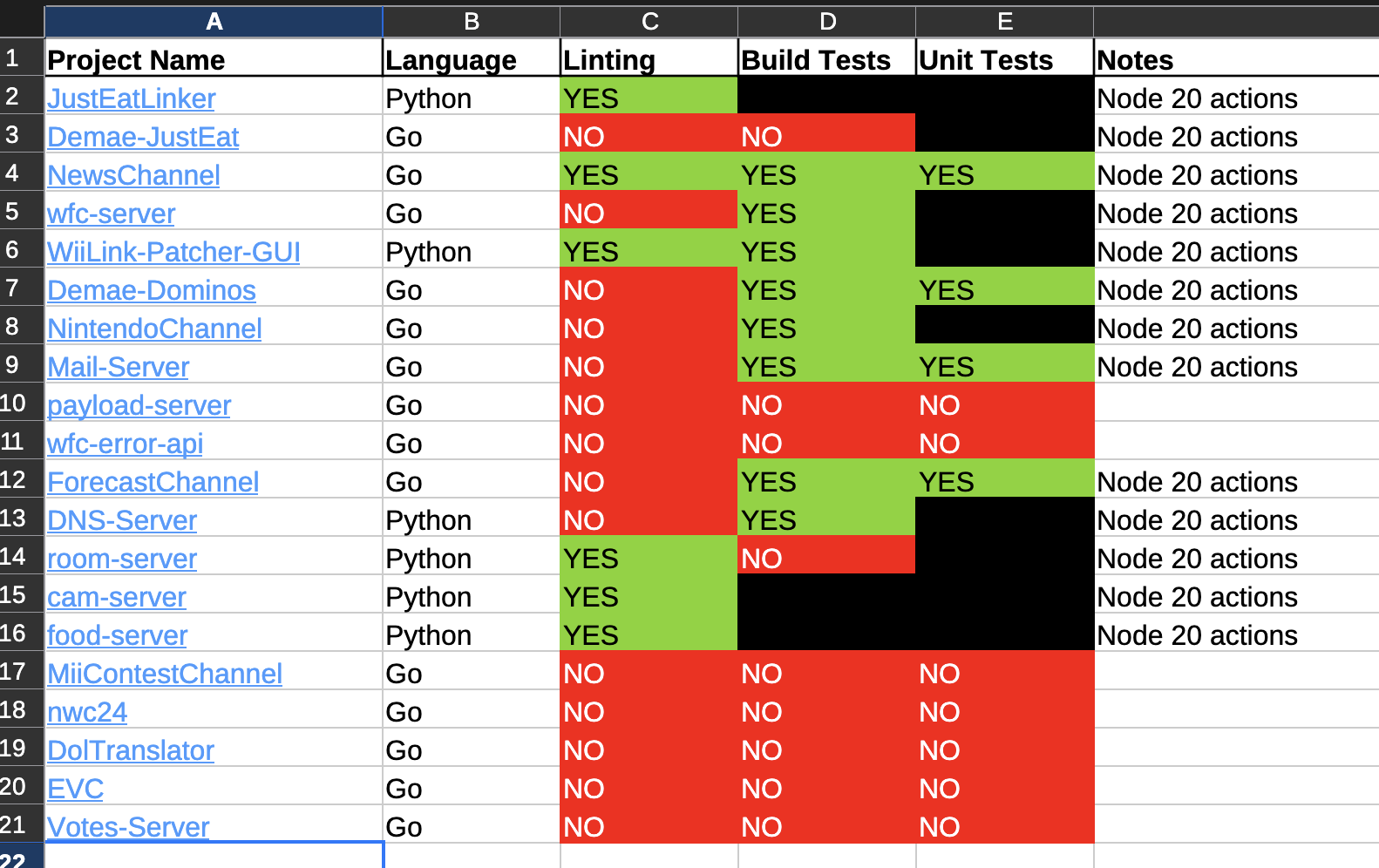
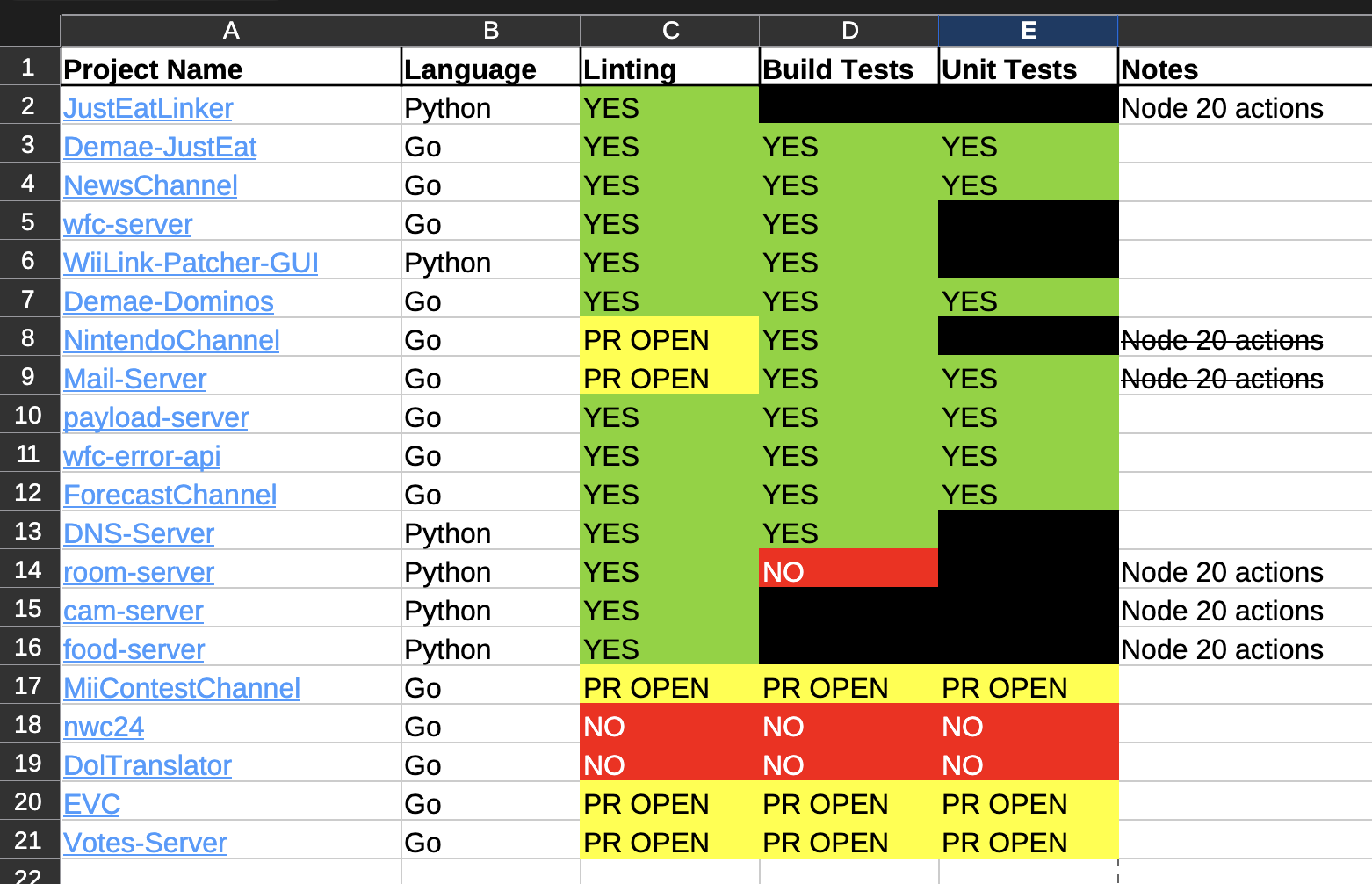
<p>The first thing I did was go through the active (or at least somewhat recently active) projects on the WiiLink GitHub and make a spreadsheet of which ones already had CI workflows, and what they were for. This gave me an idea of what projects I needed to work on, what languages they were in, and any additional notes I needed to worry about.</p>

<p><img src="/hfoss2026-blogs/assets/2026-04-05-campbell-contrib-2/spreadsheet-start.png" alt="" /></p>

<p>Nearly all repositories were missing at least one components, and even the ones that weren’t were using action steps that ran on Node.js 20, which is EoL and GitHub will be deprecating soon.</p>

<p>Each repository needed a specific list of CI actions run depending on the language.</p>

<p>For Go repositories, this was:</p>
<ol>
  <li>A build step, to make sure the commit can compile.</li>
  <li>A test step for all repositories with tests written, to ensure that they’re passing.</li>
  <li>A linting run to flag formatting and related issues.</li>
</ol>

<p>And for Python, this was:</p>
<ol>
  <li>An optional build step, for repositories that are meant to be built with PyInstaller or Nuitka.</li>
  <li>A test step.</li>
  <li>A linting run.</li>
</ol>

<p>These are mostly the same, but the implementations between the repositories did have to be a little different.</p>

<h2 id="pr-speedrun">PR Speedrun</h2>

<p>Once I had my plans laid out, I went through and set up proper CI with updated Node.js 24 actions for the first Go repository in the list, committed, and made sure that everything ran as expected. From there, I had a base that was applicable to essentially all of the other Go repositories, since the linting and a basic <code class="language-plaintext highlighter-rouge">go build</code> then <code class="language-plaintext highlighter-rouge">go test</code> workflow are fairly universal.</p>

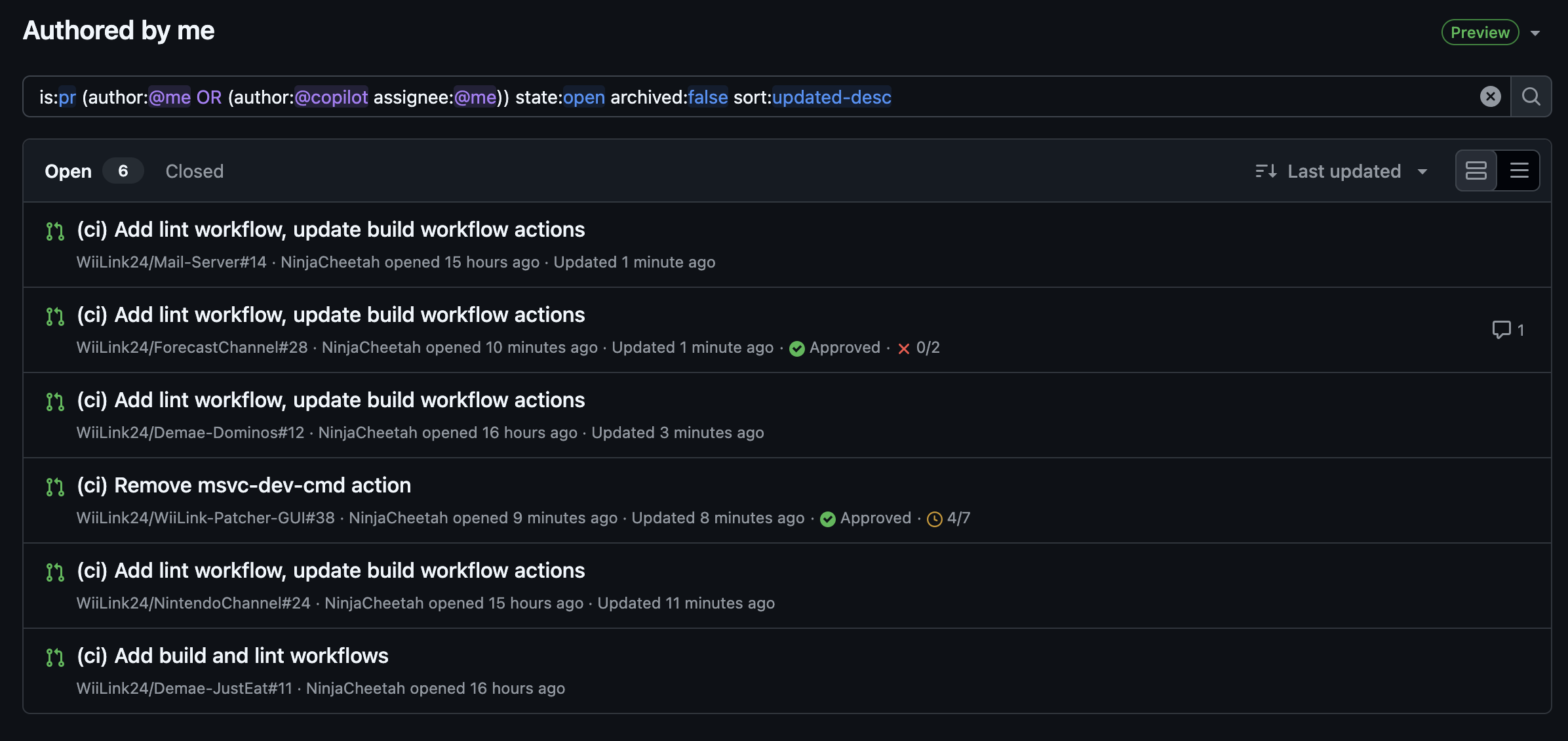
<p>Once I had that down, I was able to open a lot of PRs in a very short time adding the same workflows to everything (and don’t worry, they knew this was coming). I didn’t think to take too many screenshots of my open PRs, but I did grab this one of the largest number of PRs I’ve had open at once:</p>

<p><img src="/hfoss2026-blogs/assets/2026-04-05-campbell-contrib-2/pr-speedrun.png" alt="" /></p>

<p>For most of these repositories, it was mostly just a waiting game once the PRs were opened. The workflows all worked, I just needed someone to take a peek at them and merge them in. However, like with many projects, I had my fair share of…</p>

<h2 id="edge-cases">Edge Cases</h2>

<p>Most of the Go repositories passed tests without any trouble, but some of these repositories expect to actually have data in order to test them. And one of this repositories, <a href="https://github.com/WiiLink24/EVC">EVC</a>, is notable for requiring an active PostgreSQL database connection in order to run the tests.</p>

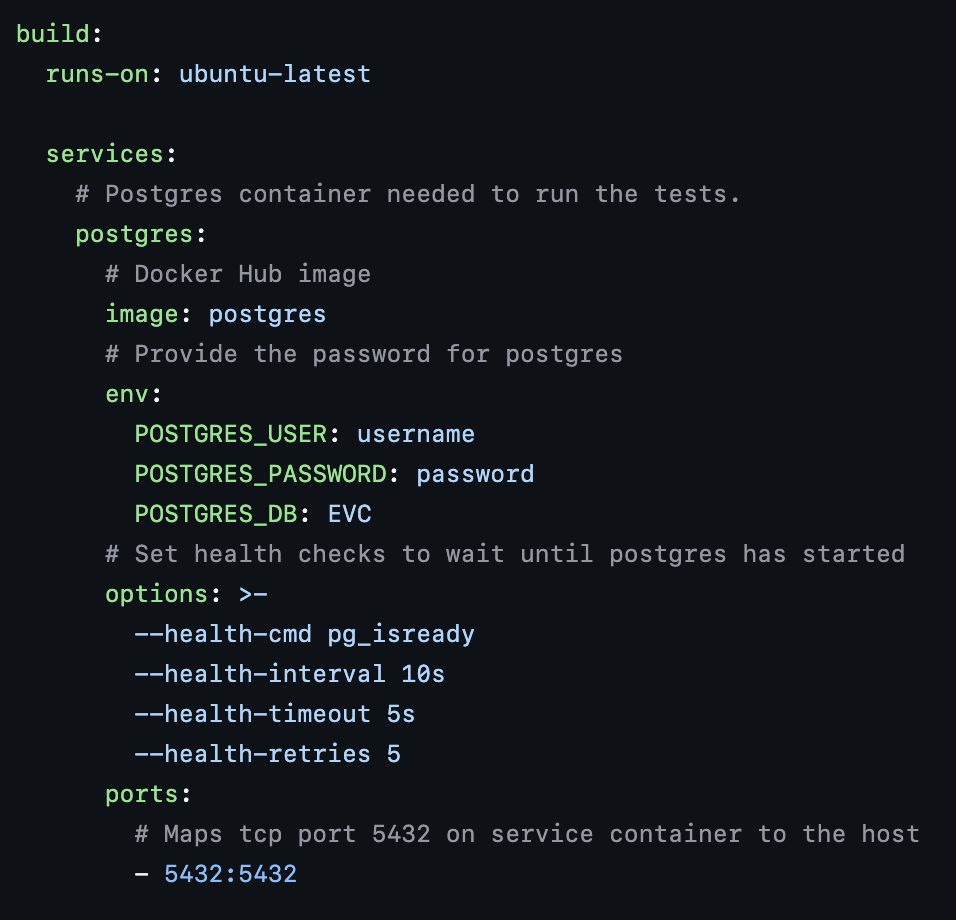
<p>I don’t have a good way to provide visuals for the conversation around this, but I was told that if I was going to add CI to the EVC repository, it was expected that I would actually get the tests running. Now, I had no idea how to do that given that I needed a database. I also did not really receive any direction from the other WiiLink people (everyone is kind of busy and this is not there #1 priority), so I was left on my own to figure it out. And I learned something really interesting! Did you know that you can run Docker containers as services as part of your GitHub Actions workflow? Because you can!</p>

<p><img src="/hfoss2026-blogs/assets/2026-04-05-campbell-contrib-2/services-in-gha.png" alt="" /></p>

<p>It’s kind of like writing a <code class="language-plaintext highlighter-rouge">compose.yaml</code> file, you just tell it what container you want and any parameters it needs, and then your actions workflow will have access to it.</p>

<p>With a functioning database in hand, I also spun up a local PostgreSQL container and figured out what the table needed to actually look like, based on the code that connects to it, and then I was able to add all the columns I needed to actually run the tests. I also needed a signing key because the files it creates during testing are signed, so I added a step for the workflow to create a new signing key during the run, since the key should just be a dummy key and isn’t being used for anything anyway.</p>

<p>I’m definitely skimming over some details here to not get way too technical, but the summary is that this was a really difficult repository to work with, and I was kind of left out on my own to figure out how to get it working.</p>

<h2 id="conclusions">Conclusions</h2>

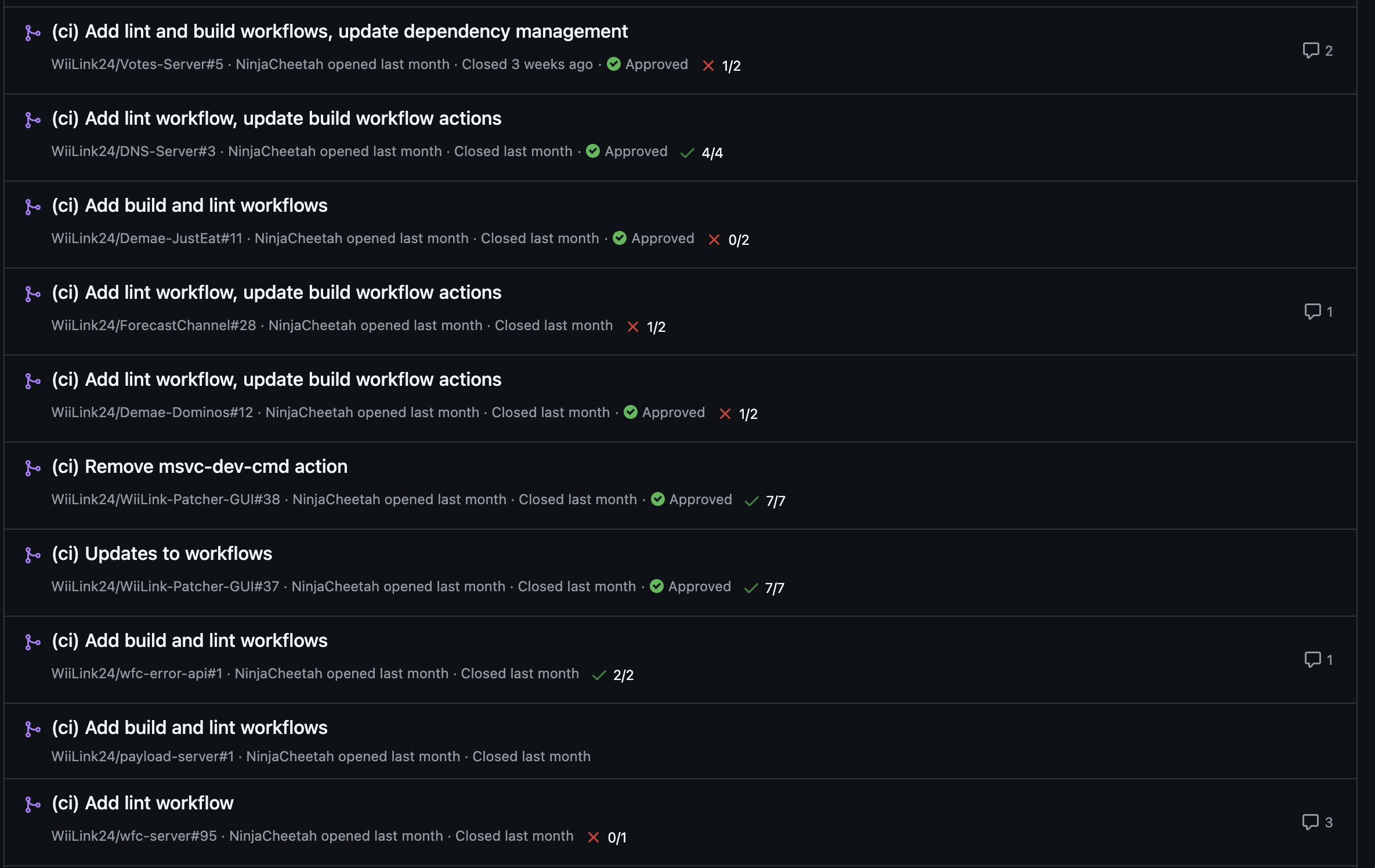
<p>Lots and lots of the PRs I made have been merged! Here, just take a look:</p>

<p><img src="/hfoss2026-blogs/assets/2026-04-05-campbell-contrib-2/prs-merged.png" alt="" /></p>

<p>I’m still waiting on a few though, which you can also see if we consult the spreadsheet:</p>

<p><img src="/hfoss2026-blogs/assets/2026-04-05-campbell-contrib-2/spreadsheet-end.png" alt="" /></p>

<p>But the majority and done and merged! The few that are still marked NO are only NO because I either have unanswered questions about what’s supposed to happen with those repositories, or just because the same CI I’ve been implementing everywhere else doesn’t really make sense (because the project is essentially completed and won’t really be getting any more contributions).</p>

<p>This was a lot of fun to work on overall, and it was nice to be able to contribute to WiiLink directly more. I hope to be able to do more infrastructure stuff for them in the future, because I like that kind of stuff and also any gained experience is good experience. I also want the their infra to be less scary, because in many ways they are legitimately one small issue away from everything going down. So y’know, I want to help it not be like that.</p>

<p>And now I’m going to go ping sketch and ask him to merge some of those last open PRs, because writing this article has reminded me of them.</p>]]></content><author><name>Campbell Bagley</name></author><category term="Contribution" /><summary type="html"><![CDATA[As established in my contribution 1, I’ve been involved in the Wii modding community for a while now. I’ve primarily been working on my own stuff, but a little while back a library I made was picked up by WiiLink, a group that has been working on modern and open source revivals for the Wii’s discontinued online services, to make a new and better installer/patcher. Because they were suddenly reliant on something I made, they pulled me into their development Discord server so that I could fix any bugs that pop up or answer any questions they might have.]]></summary></entry><entry><title type="html">Mangowm Contribution</title><link href="/hfoss2026-blogs/posts/duke-contrib-2.html" rel="alternate" type="text/html" title="Mangowm Contribution" /><published>2026-05-03T00:00:00+00:00</published><updated>2026-05-03T00:00:00+00:00</updated><id>/hfoss2026-blogs/posts/duke-contrib-2</id><content type="html" xml:base="/hfoss2026-blogs/posts/duke-contrib-2.html"><![CDATA[<p>For my second contribution, I wanted to take on something a little larger than my first one. After bouncing around a couple of projects, I decided to focus on <a href="https://github.com/mangowm/mango">mango</a>, a tiling wayland linux compositor based on dwl. I recently switched to it, but was annoyed at how it treated mouse and trackpad sensitivity the same (meaning my trackpad would move the cursor too slowly while my mouse would move it too fast) and decided to make some changes to fix this issue.</p>

<h2 id="what-is-mangowm">What Is Mangowm?</h2>
<p>Mangowm (aka mangowc and just mango) is a “modern wayland compositor based on wlroots &amp; scenefx.” It is a fork of DWL, an implementation of a wayland compositor using suckless philosophies in the vein of DWM, which used X11. It is more lightweight than something like hyperland, but because it is a newer project it has less features.</p>

<p><img src="../assets/2026-05-03-duke-contrib-2/website.png" alt="mango website" /></p>

<h2 id="getting-involved">Getting Involved</h2>
<p>To engage in the community, I first joined the discord server and asked some questions about if the feature I wanted to implement was already in the codebase (as a sanity check, I never got a response though). Then I checked if there were any issues or pull requests to address the feature (there werent), and quickly set off to find build instructions. After finding the right instructions (fixing a small issue in the readme along the way) I installed the needed dependencies and built the project without any major problems.</p>

<p><img src="../assets/2026-05-03-duke-contrib-2/discord.png" alt="discord message" />
<img src="../assets/2026-05-03-duke-contrib-2/building.png" alt="build instructions" /></p>

<h2 id="the-issue">The Issue</h2>
<p>As mentionend before, mice and trackpads share the same acceleration profile and speeds in the configuration file, so I wanted to add three more options (trackpad_accel_profile, trackpad_accel_speed, and trackpad_axis_scroll_factor) to fix this. Working with the codebase was relatively simple since the entire compositor is pretty much implemented in one c file (albeit one that is almost 7,000 lines long) and I was able to figure out how to add my features and a couple of helper functions while testing my alterations out along the way. After making my changes, I pushed them to my fork and opened a <a href="https://github.com/mangowm/mango/pull/889">pull request</a> which will hopefully be accepted in the future. In the meantime, I will definately be using my local version because of the new feature.</p>

<p><img src="../assets/2026-05-03-duke-contrib-2/mouse-config.png" alt="mouse config options" /></p>

<h2 id="the-experience">The Experience</h2>
<p>Overall making this change was a lot simpler than I thought it would be at first due to the suckless philosophy surrounding the project, and I highly reccomend using and contributing to this project if you are interested in tiling wayland compositors like I am!</p>

<p><img src="../assets/2026-05-03-duke-contrib-2/pr.png" alt="my pull request" /></p>]]></content><author><name>Duke Bredemann</name></author><category term="Contribution" /><summary type="html"><![CDATA[For my second contribution, I wanted to take on something a little larger than my first one. After bouncing around a couple of projects, I decided to focus on mango, a tiling wayland linux compositor based on dwl. I recently switched to it, but was annoyed at how it treated mouse and trackpad sensitivity the same (meaning my trackpad would move the cursor too slowly while my mouse would move it too fast) and decided to make some changes to fix this issue.]]></summary></entry><entry><title type="html">SimplerGrants Quickstart Guide</title><link href="/hfoss2026-blogs/posts/murphy-a-contrib-2.html" rel="alternate" type="text/html" title="SimplerGrants Quickstart Guide" /><published>2026-05-03T00:00:00+00:00</published><updated>2026-05-03T00:00:00+00:00</updated><id>/hfoss2026-blogs/posts/murphy-a-contrib-2</id><content type="html" xml:base="/hfoss2026-blogs/posts/murphy-a-contrib-2.html"><![CDATA[<h2 id="simplergrants-introduction">SimplerGrants Introduction</h2>

<p>SimplerGrants is an open source tool to help people be able to search for and apply to grants. It aims to create a simpler application process for grants, and make them easier to navigate and read effectively.</p>

<p><img src="../assets/images/2026-05-03-murphy-a-contrib-2/simplergrants-homepage.png" alt="Main page of CampusPulse" />
<em>Main page of SimplerGrants</em></p>

<p>I chose this project as it has some good issues that I can tackle, and I tackled some small issues already for this project. I also had completed some small issues prior.</p>

<h2 id="the-issue-and-contribution">The Issue and Contribution</h2>

<p>This issue I decided to tackle was an issue to streamline the onboarding process for newcomers to contributing to SimplerGrants, and more specifically, the setup for the development environment for the project.</p>

<p>I went ahead and created a new quickstart documentation file in markdown for setting up SimplerGrants locally for development. I did this for frontend, API, and Full Stack (both frontend and API). I followed the criteria for the opened <a href="https://github.com/HHS/simpler-grants-gov/issues/9548">issue</a> for creating the <a href="https://github.com/HHS/simpler-grants-gov/pull/9606">PR</a>.</p>

<p><img src="../assets/images/2026-05-03-murphy-a-contrib-2/issue-image.png" alt="Issue Description" />
<em>The associated issue and the acceptance criteria</em></p>

<p><img src="../assets/images/2026-05-03-murphy-a-contrib-2/pr-image.png" alt="PR Description" />
<em>The PR I created which is still in the process of being merged</em></p>

<p>Currently, this PR is still open and the only thing blocking me is ensuring the prerequisites are correct for development setup which I am currently sorting for this to properly get merged.</p>]]></content><author><name>Ashton Murphy</name></author><category term="Contribution" /><summary type="html"><![CDATA[SimplerGrants Introduction]]></summary></entry><entry><title type="html">Ente Auth Icons</title><link href="/hfoss2026-blogs/posts/tori-contributions.html" rel="alternate" type="text/html" title="Ente Auth Icons" /><published>2026-05-03T00:00:00+00:00</published><updated>2026-05-03T00:00:00+00:00</updated><id>/hfoss2026-blogs/posts/tori-contributions</id><content type="html" xml:base="/hfoss2026-blogs/posts/tori-contributions.html"><![CDATA[<p>For my second contribution, I contributed to <a href="https://github.com/ente-io/ente">ente</a>’s 2FA app by adding icons for the websites Smogon and Art Fight.</p>

<h2 id="what-is-ente-auth">What is Ente Auth?</h2>

<p>Ente Auth is a free and open-source 2FA app.</p>

<h2 id="why-did-you-pick-it">Why did you pick it?</h2>

<p>I use Ente Auth for my 2FA tokens. I also have accounts on Smogon and on Art Fight, and I was annoyed that the icons for them were blank. I tried making a contribution and adding them back in August, but the files for those two websites were eventually deleted for being too large. I’ve been meaning to try again but I haven’t gotten around to it until now.</p>

<h2 id="how-did-your-commarch-experience-show-you-it-would-be-good-to-work-with">How did your CommArch experience show you it would be good to work with?</h2>

<p>I had a good experience contributing to them before.</p>

<h2 id="what-resources-were-already-available">What resources were already available?</h2>

<p>It has a <a href="https://github.com/ente-io/ente/blob/main/mobile/apps/auth/docs/adding-icons.md">short document describing how to contribute custom icons</a> linked in its CONTRIBUTION.md. It explicitly states that they do not accept SVGs that are greater than 20 KB. Both Art Fight and Smogon have complicated SVGs that were over 20 KB. I had to find a way to compress them, so I went to Google.</p>

<h2 id="the-contribution">The Contribution</h2>

<p>I found the icons on the websites for Smogon Forums and Art Fight and downloading them. I’ve experimented with opening them in Inkscape and using the optimized SVG file format to compress them. No matter what I did, it was still over 20 KB for both of them. With Smogon, I gave up with getting the entire SVG done and tried getting part of it instead, which did work. I had to experiment far more with Art Fight because it kept getting down to 24 KB, but no larger than that.</p>

<p>These are the (now compressed) screenshots of the icons I was trying to contribute.</p>

<p><img src="../assets/2026-05-03-tori-riggs-contribution/2026-05-03_tori_riggs_art_fight_icon.png" alt="" />
<img src="../assets/2026-05-03-tori-riggs-contribution/2026-05-03_tori_riggs_smogon_icon.png" alt="" /></p>

<p>As you can see, they are both very detailed logos.</p>

<p>I finally tried using an actual website dedicated to compressing SVGs, and I found <a href="https://svgomg.net/">SVGOMG</a>. It wasn’t getting Art Fight’s icon below 20 KB…until I tried lowering the number precision down from 3 to 2. That made a massive difference in the file size and I couldn’t even see any difference from the original!</p>

<p>That was when I decided to try running the Smogon icon through this website and lowering the number precision. I had to lower it from 3 to 1 to get it below 20 KB. I was able to notice a change in the lineart for Koffin (the purple Pokemon in the center), but it didn’t look bad in any way and probably wouldn’t even be noticed unless you were actively looking for a difference.</p>

<p>When I made my pull request, I had to agree to the CLA through a website called <a href="https://cla-assistant.io/ente-io/ente?pullRequest=10257">cla-assistant.io</a>. I have never heard of this website before now, so that was interesting. Thankfully, it was only a few clicks to sign in with my GitHub account and hit “agree.”</p>

<h2 id="response-to-the-contribution">Response to the Contribution</h2>

<p>I am still waiting for approval from the maintainers. There has been no other response as I just made the PR.</p>

<p>Link: <a href="https://github.com/ente-io/ente/pull/10257">https://github.com/ente-io/ente/pull/10257</a></p>

<p><img src="../assets/2026-05-03-tori-riggs-contribution/2026-05-03_tori_riggs_issue1.png" alt="" />
<img src="../assets/2026-05-03-tori-riggs-contribution/2026-05-03_tori_riggs_issue2.png" alt="" /></p>]]></content><author><name>Tori Rigoglioso</name></author><category term="Contribution" /><summary type="html"><![CDATA[For my second contribution, I contributed to ente’s 2FA app by adding icons for the websites Smogon and Art Fight.]]></summary></entry><entry><title type="html">Abandoned Subway 2</title><link href="/hfoss2026-blogs/posts/abandoned-subway-2.html" rel="alternate" type="text/html" title="Abandoned Subway 2" /><published>2026-05-02T00:00:00+00:00</published><updated>2026-05-02T00:00:00+00:00</updated><id>/hfoss2026-blogs/posts/abandoned-subway-2</id><content type="html" xml:base="/hfoss2026-blogs/posts/abandoned-subway-2.html"><![CDATA[<p># Rochester Abandoned Subway: Part 02
May 2, 2026 • Joshua DeWinter</p>

<h2 id="introduction-to-the-community">Introduction to the community</h2>
<h3 id="what-the-project-is">What the project is</h3>
<p>For my second contribution, I have continued working on the Rochester Abandoned Subway
VR experience - a recreation of the Rochester Abandoned Subway in VR!</p>

<p><img src="../assets/2026-05-02-abandoned-subway-2/abandoned-subway-rl.jpg" alt="Rochester Abandoned Subway Picture" /></p>
<h3 id="why-you-picked-it">Why you picked it</h3>
<p>I picked this project because VR is a big passion of mine, and I was put on this
project for my DHSS Seminar with Jess</p>
<h3 id="how-comm-arch-showed-this-would-be-good-to-work-with">How Comm Arch showed this would be good to work with</h3>
<p>It is a small project that I could really get into and work on in several capacities</p>
<h3 id="what-resources-were-already-available">What resources were already available</h3>
<p>The project has been in development digitally since 2022, and in VR since 2024,
with lots of photos and references for how the subway is layed out.</p>
<h2 id="the-issue">The issue</h2>
<h3 id="how-i-decided-to-pick-the-issue-and-what-it-was">How I decided to pick the issue (and what it was)</h3>
<p>Building off of getting the smooth locomotion working, the rest of the player
controller (physical hands, climbing) and other interactions (pressing buttons)
needed to be added for complete immersion.</p>

<p><img src="../assets/2026-05-02-abandoned-subway-2/physical-playground.png" alt="The &quot;Physical Playground&quot; testing scene" /></p>
<h3 id="how-i-pursued-it">How I pursued it</h3>
<p>I started off by referring back to a project I worked on a couple years ago where
I did something relatively similar in terms of the player controller. Replicating
that was relatively simple, and then it was on to the interactions.</p>
<h3 id="what-happened-during-the-process">What happened during the process</h3>
<p>The climbing remains a slight issue, with the area the player is able to grab to
pull themself up being to large (with no current discernable cause). Even so, it
worked well enough that it wasn’t the most notable and I proceeded to making the
buttons.</p>
<h3 id="what-blocked-the-project">What blocked the project</h3>
<p>The buttons themselves caused me much grief. I wanted them to be physical, using
some sort of spring physics to push themselves back up between two points, however
what I had been looking into did not pan out and my physics button was placed on
the backburner. Thus, a simple collider that triggers an animation of the button
being pressed was vastly simpler to create and functioned well.</p>

<p><img src="../assets/2026-05-02-abandoned-subway-2/buttons.png" alt="VR Buttons" /></p>
<h3 id="how-i-succeeded-in-getting-it-acceptedmerged">How I succeeded in getting it accepted/merged</h3>
<p>After a lot of messing around with SSH Keys, I was finally able to push my work
to the repository as I am a primary contributor.</p>
<h2 id="conclusion">Conclusion</h2>
<h3 id="what-did-i-learn">What did I learn</h3>
<p>That making a physics based button in Godot was not as simple as I was thinking
and it will take more time and effort to get it working how I want.</p>
<h2 id="will-i-contribute-to-this-community-again">Will I contribute to this community again?</h2>
<p>I will be contributing to the project continuously for the next calendar year if
everything goes to plan.</p>]]></content><author><name></name></author><summary type="html"><![CDATA[# Rochester Abandoned Subway: Part 02 May 2, 2026 • Joshua DeWinter]]></summary></entry><entry><title type="html">Lukas Peters - Fixing the UI in Ritchie’s Bus App</title><link href="/hfoss2026-blogs/posts/lmp6173-bus-app.html" rel="alternate" type="text/html" title="Lukas Peters - Fixing the UI in Ritchie’s Bus App" /><published>2026-05-02T00:00:00+00:00</published><updated>2026-05-02T00:00:00+00:00</updated><id>/hfoss2026-blogs/posts/lmp6173-bus-app</id><content type="html" xml:base="/hfoss2026-blogs/posts/lmp6173-bus-app.html"><![CDATA[<h1 id="picking-ritchies-bus-app">Picking Ritchie’s Bus App</h1>

<p>I picked Ritchie’s Bus App for my contribution because I know few people who use it to track their bus schedule. I do see that it has not really been maintained for a while so I am hoping that a contribution can get it back up and running.</p>

<p><img src="../assets/lmp6173-2/ritchie.png" alt="frontpage" /></p>

<h1 id="contributing-to-ritchies-bus-app">Contributing to Ritchie’s Bus App</h1>

<p>It was easy to find an issue to work on as the maintainer had a project board for the repository.</p>

<p><img src="../assets/lmp6173-2/project-board.png" alt="projectboard" /></p>

<p>I looked for simple UI issues so I can get a better understanding of the codebase and I saw this issue:</p>

<p><img src="../assets/lmp6173-2/github-issue.png" alt="githubissue" /></p>

<h1 id="working-on-the-issue">Working on the issue</h1>

<p>I looked for the “Rate!” button in the HTML/CSS and messed with the parameters. Adding “text-white” fixes the issue.</p>

<p><img src="../assets/lmp6173-2/the-issue.png" alt="theissue1" />
<img src="../assets/lmp6173-2/the-issue2.png" alt="theissue2" /></p>

<p><img src="../assets/lmp6173-2/the-fix.png" alt="thefix1" />
<img src="../assets/lmp6173-2/the-fix2.png" alt="thefix2" /></p>

<h1 id="how-much-effort-did-this-assignment-require">How much effort did this assignment require?</h1>

<p>The contribution itself was fairly low effort.</p>]]></content><author><name>Lukas Peters</name></author><category term="Contribution" /><summary type="html"><![CDATA[Picking Ritchie’s Bus App]]></summary></entry><entry><title type="html">Wii Modding Guide Updates</title><link href="/hfoss2026-blogs/posts/campbell-contrib-1.html" rel="alternate" type="text/html" title="Wii Modding Guide Updates" /><published>2026-04-05T00:00:00+00:00</published><updated>2026-04-05T00:00:00+00:00</updated><id>/hfoss2026-blogs/posts/campbell-contrib-1</id><content type="html" xml:base="/hfoss2026-blogs/posts/campbell-contrib-1.html"><![CDATA[<p>For my contribution, I made an update to the “official” Wii modding guide! (“Official” because I’m not quite sure how official any modding guide can truly be, but this is considered to be the correct guide to follow throughout the community.) This is the guide that you’re meant to follow if you decide you want your Wii to be extra cool, and you can find it at <a href="https://wii.hacks.guide/">wii.hacks.guide</a>. The GitHub repository can be found <a href="https://github.com/hacks-guide/Guide_Wii">here</a>.</p>

<p>I have been involved in the Wii modding scene for a number of years now. I grew up with a Wii as my primary means of playing video games, so I’ve always been pretty fond of it. When I discovered that you could mod it and do even more with it (like connecting to modern revivals of the long-dead online services!), I thought that was the coolest thing ever and modded mine immediately. Over the pandemic, I got even more invested because I had a lot of time on my hands, and with stuff like the <a href="https://en.wikipedia.org/wiki/Nintendo_data_leak">Nintendo Gigaleak</a> happening, we suddenly knew even more about the console than we did before. This kicked me off on a whole journey of trying to mess with the Wii’s software myself, and actually lead to the birth of my personal blog with <a href="https://ninjacheetah.dev/2021/01/30/wii-dvd-p1.html">“Enabling the Hidden Wii DVD Icon Part 1”</a> back in 2021.</p>

<p>There is a lot of additional context between that story and now that explains how I got as involved in the community as I have, and I recently summarized a lot of that story in <a href="https://ninjacheetah.dev/2026/03/11/the-history-of-libwiipy.html">“The History of libWiiPy, WiiPy, and NUSGet”</a> on my blog, which is not required reading for this but hey I wouldn’t mind if you did read it.</p>

<h2 id="getting-involved">Getting Involved</h2>

<p>When it came to getting involved, I’ve kind of been getting myself involved over the last couple of years. To give a <em>really</em> brief TL;DR of my history blog post, I identified some ancient Windows-only PC tools that were used for modifying the proprietary file formats used on the Wii that all dated to ~2009 and decided that I was going to replace them. My method of getting involved was essentially just making something new and good and waiting for people to show up, and hey it may have taken a little while but it worked! In January of this year, the Wii guide switched over from telling people to use “NUS Downloader”, one of these ancient Windows-only tools, to my program <a href="https://github.com/NinjaCheetah/NUSGet">NUSGet</a>, which is much more modern and also cross platform. The simplest way to explain what these tools do is that they download content from Nintendo’s update servers. This addition, however, was not my doing and was done by someone else who thought that NUSGet was worthy of taking NUS Downloader’s place in the guide. I got involved for my contribution by identifying some concerns with the way that they instructed people to use my program, and making corrections.</p>

<h2 id="the-issue">The Issue</h2>

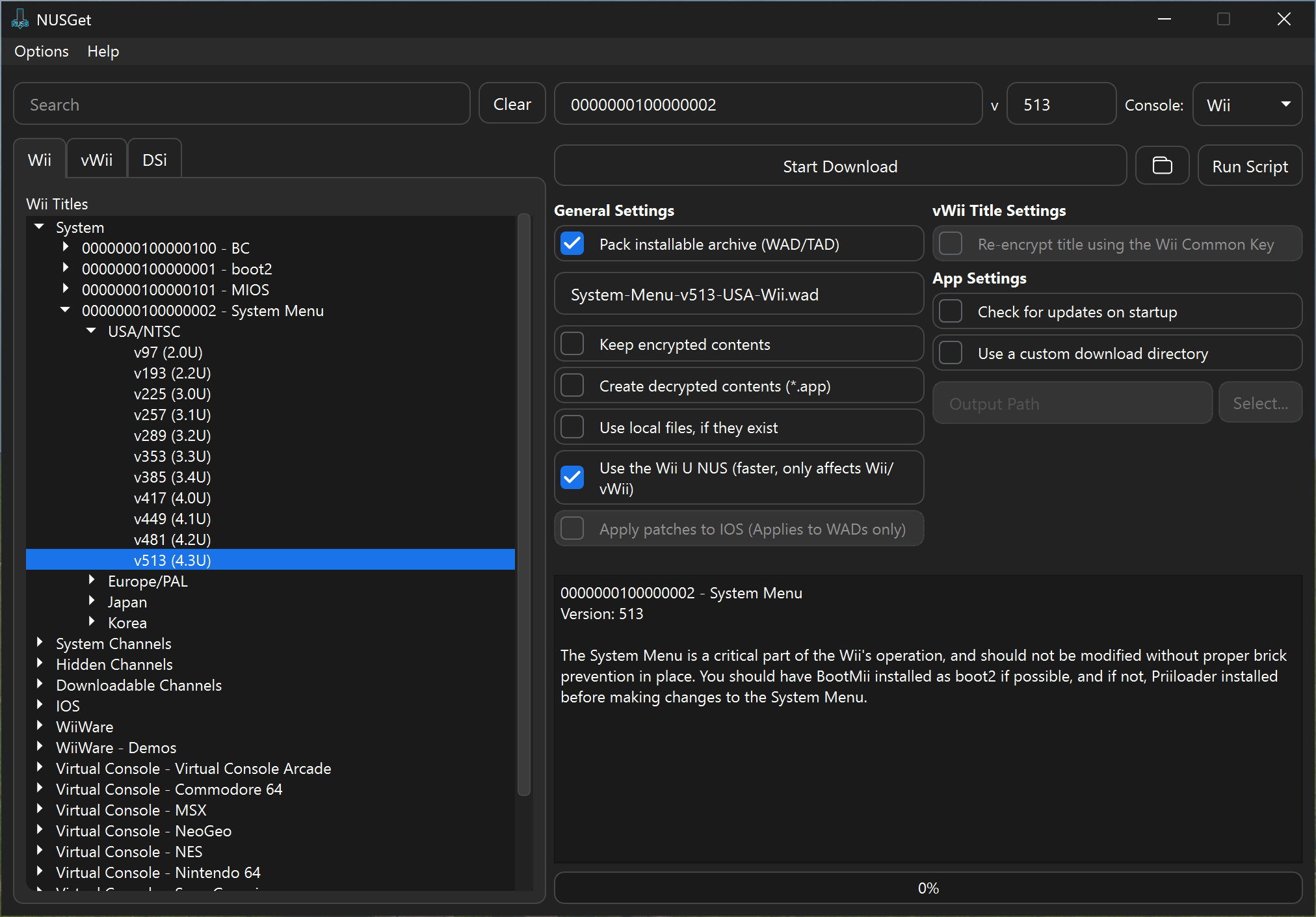
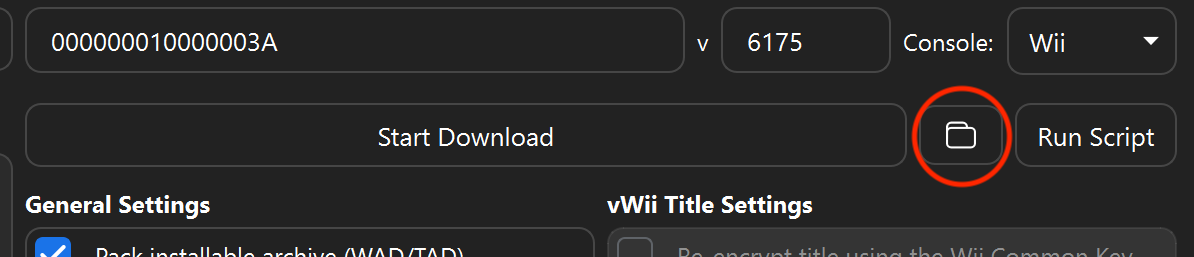
<p>The main issue I identified was a pretty simple one. In NUSGet v1.4.3, the latest version at the time that someone added NUSGet into the guide, there wasn’t a button in the UI to open the folder that it downloaded stuff to. The default directory is <code class="language-plaintext highlighter-rouge">~/Downloads/NUSGet Downloads/</code>, and the person adding it to the guide made the interesting decision of having people set a custom output directory instead of instructing them how to open the default one. I thought this was strange, and so I added a button to the UI in v1.5.0 that opens the default download directory in your default file manager to make things easier.</p>

<p>Given that it had been a couple of months since I added it and the guide was still the same, I decided I should go and simplify things so that people wouldn’t get confused over the directions to change the output directory every time they were instructed to download something. I adapted every page that had you use NUSGet to no longer have the extra step to change the output, and to instead just tell you to press the little folder button. I also went and updated every screenshot so that they would actually be of v1.5.0 and have the folder button, like so:</p>

<p><img src="/hfoss2026-blogs/assets/2026-04-05-campbell-contrib-1/nusget-wiimenu-dl-update.png" alt="" /></p>

<p>I also went and added a closeup screenshot with a circle just so that nobody could get confused when the guide said to press the folder button to open the output directory:</p>

<p><img src="/hfoss2026-blogs/assets/2026-04-05-campbell-contrib-1/nusget-open-downloads.png" alt="" /></p>

<h2 id="merging-it-in">Merging it In</h2>

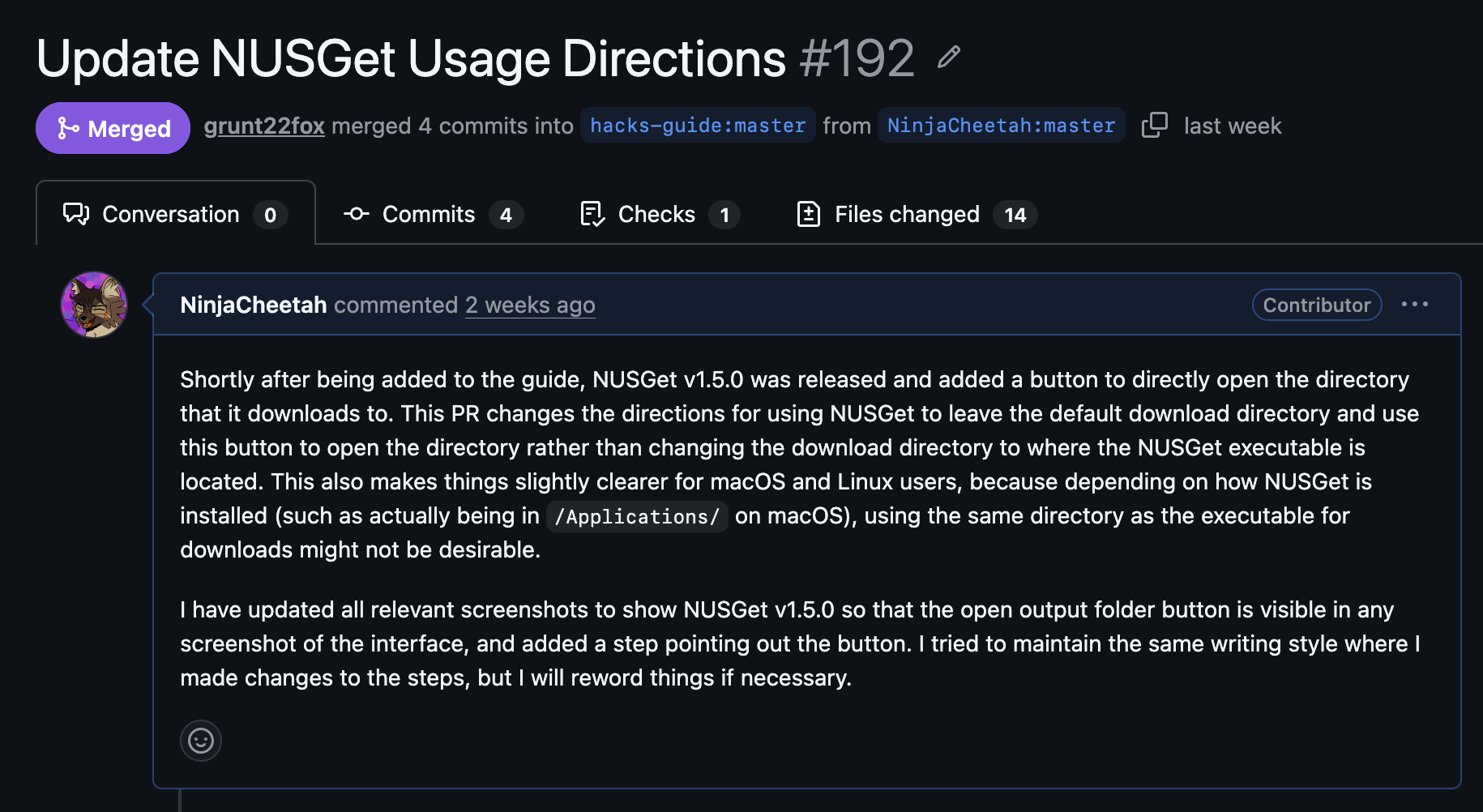
<p>Actually getting it merged was pretty simple. I just opened a new PR on the repo:</p>

<p><img src="/hfoss2026-blogs/assets/2026-04-05-campbell-contrib-1/pr.png" alt="" /></p>

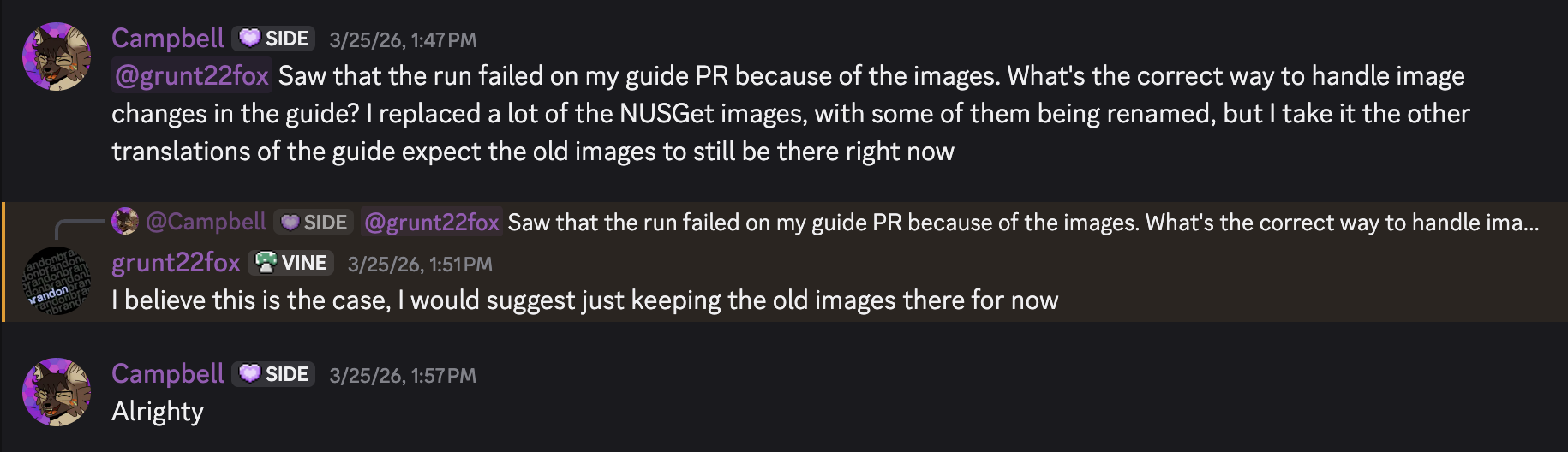
<p>And waited a couple of days for a maintainer to get around to looking at it and merging it. I did also mildly break the site so that it wasn’t building, because I deleted some old screenshots that weren’t in use anymore and apparently that breaks things when the translations aren’t updated since the non-English versions of the guide still expect the old images. Whoops.</p>

<p><img src="/hfoss2026-blogs/assets/2026-04-05-campbell-contrib-1/oops-i-broke-the-images.png" alt="" /></p>

<p>Once that was sorted, my PR was merged! Hooray!</p>

<p>If you want to see exactly where my contributions are in the guide, you can see my screenshots and updated directions <a href="https://wii.hacks.guide/cios?tab=wii/family-edition">here on the cIOS page</a>. Just make sure to start from the beginning if you’re actually modding your Wii :)</p>]]></content><author><name>Campbell Bagley</name></author><category term="Contribution" /><summary type="html"><![CDATA[For my contribution, I made an update to the “official” Wii modding guide! (“Official” because I’m not quite sure how official any modding guide can truly be, but this is considered to be the correct guide to follow throughout the community.) This is the guide that you’re meant to follow if you decide you want your Wii to be extra cool, and you can find it at wii.hacks.guide. The GitHub repository can be found here.]]></summary></entry><entry><title type="html">Waybar Contribution</title><link href="/hfoss2026-blogs/posts/duke-contrib-1.html" rel="alternate" type="text/html" title="Waybar Contribution" /><published>2026-04-05T00:00:00+00:00</published><updated>2026-04-05T00:00:00+00:00</updated><id>/hfoss2026-blogs/posts/duke-contrib-1</id><content type="html" xml:base="/hfoss2026-blogs/posts/duke-contrib-1.html"><![CDATA[<p>For my contribution I decided to fix an issue in <a href="https://github.com/Alexays/Waybar">waybar</a>. I have been using waybar on and off for the past couple of years and have gotten familiar with how it is used, so I thought it would be a good jumping off point into the FOSS community.</p>

<h2 id="what-is-waybar">What is Waybar?</h2>
<p>Waybar is a “Highly customizable Wayland bar for Sway and Wlroots based compositors,” pretty much just a status bar for wayland linux desktops. The segments of the bar are split into ‘modules,’ and each module can be customized and styled using configuration files. The modules can display information about the system, such as the current time, battery level, CPU usage, and memory usage.</p>

<p><img src="../assets/2026-04-05-duke-contrib-1/repo.png" alt="Waybar github repository" /></p>

<h2 id="getting-involved">Getting involved</h2>
<p>In order to involve myself with the project, I looked over the documentation for the repo to find resources for contributors. The most helpful information I gained from this step was a guide on how to build the project from source, as well as some general reccomendations for new contributors which mentioned to look for issues with the ‘good first issue’ tag.</p>

<p><img src="../assets/2026-04-05-duke-contrib-1/first-issues.png" alt="Issues with the 'good first issue' tag" />
<img src="../assets/2026-04-05-duke-contrib-1/building.png" alt="Documentation on building the project" /></p>

<h2 id="the-issue">The Issue</h2>
<p>When thinking about what to contribute to the project, I found an <a href="https://github.com/Alexays/Waybar/issues/2572">issue</a> from 3 years ago (!?) that was still open about the confusing units used in the memory module. When I recently reconfigured my own setup, I noticed the same issue so I thought it would be a good issue to tackle. In short, the units used for the memory dispay were hard coded to be gibibytes despite other modules such as the disk module having customizable units. To fix this, I decided to add a configuration option to the memory module to allow for the same level of customization.</p>

<p><img src="../assets/2026-04-05-duke-contrib-1/issue.png" alt="The issue I decided to try and fix" /></p>

<h2 id="the-experience">The Experience</h2>
<p>Following the documentation on how to build the code from source, I got a development build up and running. I did a few simple tests to figure out how the code worked, and then focused my effort on adding the feature. Since the feature I wanted to implement was already working in the disk module, I based my work off of what was completed there. I added the configuration option to the memory module class and implemented a function to convert the configuration option into a divisor to apply to the current system memory. Afterwards I committed my work and submitted a <a href="https://github.com/Alexays/Waybar/pull/4975">pull request</a>, which as of the time of writing has not been accepted yet.</p>

<p><img src="../assets/2026-04-05-duke-contrib-1/pr.png" alt="My pull request" />
<img src="../assets/2026-04-05-duke-contrib-1/code.png" alt="The main segment of code that fixes the issue" /></p>]]></content><author><name>Duke Bredemann</name></author><category term="Contribution" /><summary type="html"><![CDATA[For my contribution I decided to fix an issue in waybar. I have been using waybar on and off for the past couple of years and have gotten familiar with how it is used, so I thought it would be a good jumping off point into the FOSS community.]]></summary></entry><entry><title type="html">Olivia Croteau Contribution 1: CampusPulse</title><link href="/hfoss2026-blogs/posts/olivia-croteau-post1.html" rel="alternate" type="text/html" title="Olivia Croteau Contribution 1: CampusPulse" /><published>2026-04-05T00:00:00+00:00</published><updated>2026-04-05T00:00:00+00:00</updated><id>/hfoss2026-blogs/posts/olivia-croteau-post1</id><content type="html" xml:base="/hfoss2026-blogs/posts/olivia-croteau-post1.html"><![CDATA[<h2 id="why-did-i-pick-campuspulse">Why did I pick <a href="https://campuspulse.app/">CampusPulse</a>?</h2>
<p>I originally wanted to contribute to a larger project for a larger humanitarian organization, such as <a href="https://getodk.org/">Open Data Kit</a> or <a href="https://www.navapbc.com/">Nava</a>, and build connections to those companies. However, as this is the first time I’ve ever contributed to an open source project, I quickly found that it would be best to start with something like CampusPulse where I already had knowledge of its use cases, connections to its maintainers, and fellow students who were also learning to contribute to it. In short, I chose it for my connection to its mission and community, and will take what I learned to join another community for my second contribution.</p>

<h2 id="what-was-contributing-to-campuspulse-like">What was contributing to CampusPulse like?</h2>
<p>I definitely had the easiest time getting set up with <a href="https://github.com/CampusPulse">CampusPulse homepage repo</a> compared to the other repos I tried. It only required me to install Hugo to run in a development server. Henry Sanders kindly showed me how to fork a repo and and what making a pull request actually looked like. So big thanks to him. I immediately found a typo in the README file and decided to fix it in order to practice the process. Following the instructions from the sample blog post I made my pull request and got these four automatic errors. (Note: i am unable to add a link to this PR as it was accepted and is no longer visible, but here is the <a href="https://github.com/CampusPulse/homepage/commit/1c79e2300baaaaf2231b23cb71b10366442b706c">commit</a>.)</p>

<p><img src="_posts\assetsCroteau\PR1.png" alt="Screenshot of 'Fix README typo' pull request with 4 failing checks." /></p>

<p>I sent this screenshot to Adrian, the technical lead and maintainer, and he got back to me within a couple of hours about the issue. He said that there were some out -of-date settings he had to tweak and accepted my pull request. You can see that ‘codebase’ is now spelled correctly on the <a href="https://github.com/CampusPulse/homepage/blob/main/README.md">README</a>.</p>

<h2 id="what-was-my-contribution">What was my contribution?</h2>
<p>With that process cleared up I went ahead and made a more signifigant contribution. I found an open issue ‘Idea: link to RIT web resources.’ The desired <a href="https://www.rit.edu/webresources/">link</a> was provided, so all I had to do was add it to the list of services. Each service on the homepage rendered as a clickable bubble with an icon, title, description, and of course the associated link. Each of these was stored in a datafile, so I just had to pick an icon from Fontaweesome, write the description, and add everything to the datafile. I had structured a website this way before, but I could tell it was designed to be easily added to. The CSS and JavaScript automatically applied themselves to the link I added. It definitely took me longer to figure how to go through the pull request process than it did to understand the codebase. I will note that there wasn’t a lot of documnetation of how the website was structured, or, for example, where the icons came from. Luckily I was familiar with Fontawesome and recognized links to it when I inspected the page and knew how to reference my chosen icon. This time <a href="https://github.com/CampusPulse/homepage/pull/10">my pull request</a> immediately passed all checks and awaits merging.</p>

<p><img src="_posts\assetsCroteau\PR2.png" alt="Screenshot of 'Issue #2: added link to RIT web resources' pull request with 4 passing checks." /></p>

<h2 id="how-much-effort-did-this-assignment-require">How much effort did this assignment require?</h2>
<p>The contribution itself was fairly low effort! I just had to learn how to actually go through the branching/checkout/pull request process. But I owe the ease of this process to how easy it was to set up my environmment and run the CapusPulse homepage in developer mode.</p>

<!-- 
## More Markdown features
In addition to the formatting used so far in this document, Markdown offers several other things that may be useful to blog posts. 


[Here](https://www.markdownguide.org/basic-syntax/#images-1) is a link to more documentation on markdown images.

### Tables

| Item         | Price    | # In stock |
| ------------ | -------- | ---------- |
| Juicy Apples | 1.99     | *7*        |
| Bananas      | **1.89** | 5234       |

[Here](https://www.markdownguide.org/extended-syntax/#tables) is a link to more documentation on markdown tables.

## More Jekyll Features
Jekyll can also provide some formatting and other useful features. Check out the [Jekyll docs][jekyll-docs] for more info on how to get the most out of Jekyll. Here are some notable examples:


### Code snippets


<figure class="highlight"><pre><code class="language-ruby" data-lang="ruby"><span class="k">def</span> <span class="nf">print_hi</span><span class="p">(</span><span class="nb">name</span><span class="p">)</span>
  <span class="nb">puts</span> <span class="s2">"Hi, </span><span class="si">#{</span><span class="nb">name</span><span class="si">}</span><span class="s2">"</span>
<span class="k">end</span>
<span class="n">print_hi</span><span class="p">(</span><span class="s1">'Tom'</span><span class="p">)</span>
<span class="c1">#=&gt; prints 'Hi, Tom' to STDOUT.</span></code></pre></figure>


[jekyll-docs]: https://jekyllrb.com/docs/home -->]]></content><author><name>Olivia Croteau</name></author><category term="Contribution" /><summary type="html"><![CDATA[Why did I pick CampusPulse? I originally wanted to contribute to a larger project for a larger humanitarian organization, such as Open Data Kit or Nava, and build connections to those companies. However, as this is the first time I’ve ever contributed to an open source project, I quickly found that it would be best to start with something like CampusPulse where I already had knowledge of its use cases, connections to its maintainers, and fellow students who were also learning to contribute to it. In short, I chose it for my connection to its mission and community, and will take what I learned to join another community for my second contribution.]]></summary></entry></feed>